Makely

Let's Make Life Awesome

  • Home
  • Decorating/DIY
    • Create Your Decor
    • Decorate Your Home
    • Paint Your Walls
    • Transform Your Furniture
  • Healthy Living
    • Essential Oils
    • Family Wellness
    • Household Care
  • Project Gallery
  • Contact
You are visiting: Home » Archives for Lindsay Ballard » Page 322

Even My Coffee Cup Is Scared of This Coffee Table

by Lindsay Ballard on August 30, 2009 1,038 Comments

Dear Some Random Artist-Type Person in Austin, Texas,

Recently, I was delighted to come across an offering of one of your finest works of art on CraigsList. It may pain you to know that I received it for free, but I think they say that none of the great artists were truly appreciated until they were dead. It is my sincere hope that you are still alive and kicking it in the ATX.

Why? Because I’d like to meet you. I’d like to shake your hand. And I’d like to ask you why on Earth you did this to a sweet, innocent coffee table.

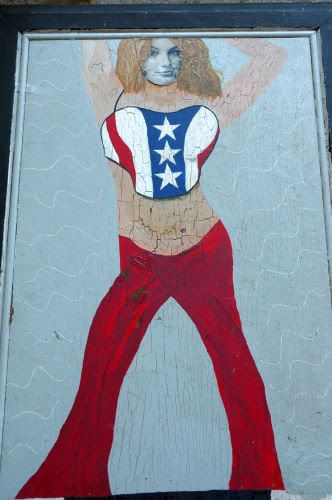
Don’t get me wrong. I love Britney Spears as much as the next person. Okay, fine. I love her way more than the next person. Regardless, even I wouldn’t have Mod Podged her face to the top of a table and then given her an oddly-shaped body. And I’m a crafty gal!

On top of that, you had to pair Ms. Brit with Kid Rock? Honestly, I don’t even get it. Why Kid Rock? Is it because the two of them obviously should have been a couple at some point? Man, the universe sure dodged a bullet on that one.

Did you just get so bored of this table that you couldn’t even bother to give Kid Rock his ratty hair? Or at the very least finish painting his arm?
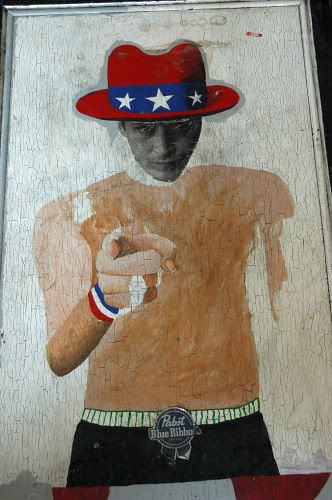
Okay, I will admit that the Pabst Blue Ribbon belt buckle is a nice touch. Props to you for that.

Random Artist-Type Person, I’d like to thank you for your creative endeavors. If it wasn’t for you, I never would have gotten this table for free from someone on CraigsList, who got it for free from someone on CraigsList, who got it for free from someone on CraigsList, who got it for free from someone on CraigsList.
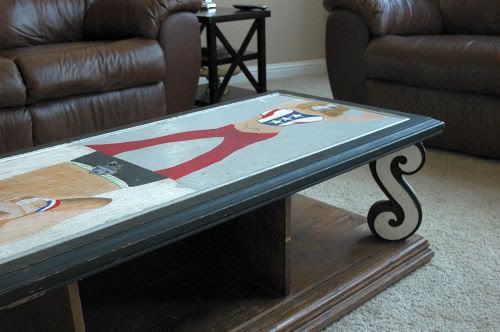
This beauty cannot be traced past that, but I know that I am now at least the fifth proud owner of this beautiful table. In fact, this may have been the very first item ever listed on CraigsList.

But you know what? I have taken it upon myself to right your wrong. My husband is absolutely horrified that this table has entered our home, but I keep telling him to trust me on this one. How can it possibly turn out any worse than this?

I hope Kid Rock’s creepy floating head haunts your dreams. I know it does mine.

Love,
Lindsay

P.S. I’m adding this post to the Blissfully Domestic “We are Blissfully Domestic!” Celebration. What do you think June Clever would say about this table?

we-are-bd1

P.P.S. I’m also adding this post to Beckie’s Roadkill Rescue party over at Infarrantly Creative.
“Next” Up in Google Reader

by Lindsay Ballard on August 28, 2009 591 Comments

Just for today, I’m interrupting this little decorating blog to bring you a little computer geek. Don’t run away scared! I’ll be back to my regularly scheduled revamps, spray paint, and glue gun burns on Monday.

As a lover of decorating and DIY blogs, I am always excited when I discover a new one. The tips and tricks and gorgeous rooms I see out there make my heart skip a beat and inspire my weekly Teach Me Tuesday series. The list of blogs I read (okay, covet) grows every single day.

However, with all that excitement comes a lot of time. I like to read each blog entry and comment leave a comment for the author. I have learned so much from other bloggers and want to support them to keep up the good work. I used to just bookmark all of the blogs I liked and would click through my bookmarks one by one to see if any of them had been updated.

Then, I discovered Google Reader. I could simply subscribe to each blog’s feed and all the new posts would show up in my reader (most blogs have “Subscribe” buttons you can click that deliver each new blog post into your reader). Hooray! No more clicking through a ton of links to find brand new posts.

The problem, I soon realized, was that the new posts showed up in my reader and I could read them all there, but I’d have to click an additional link to be taken to the actual blog to leave a comment. And well, I’m lazy. My commenting dropped way off because clicking that 2nd link was too much for me to handle. I’m not saying it makes sense, but that’s just how it was for me.


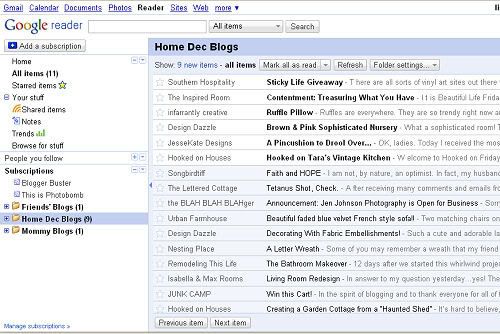
Here’s just a sample of what my Google Reader looks like.

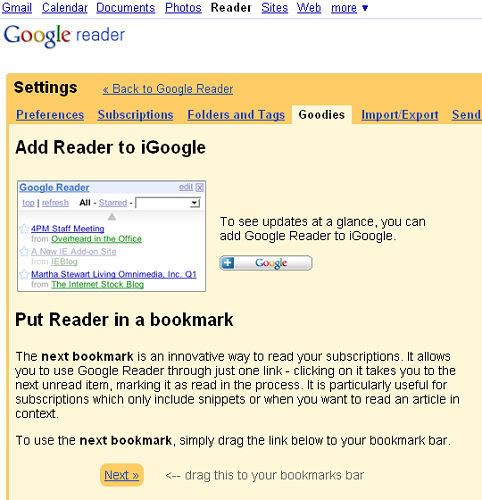
Last week, I found a super special secret about Google Reader. It’s published on Google’s blog, so I guess it’s not so secret. Anyhow, it totally rocks. Did you know that you can put a “Next” button on your browser? Clicking the “Next” button will bring up the next unread post from your reader in it’s original format (i.e. in the actual blog)? Now, I can quickly go through and read brand new posts by my favorite bloggers and easily leave a comment!

Want to try it out? Log into your Google Reader (or sign up – It’s FREE and so easy to use!) and go into Settings. Click the Goodies tab. Then, click and drag the “Next” button to your bookmarks toolbar.


Directions from Google Reader.

You can click “Next” and go through each blog at your leisure, not missing a single post, Goodwill redo or room reveal from your favorite bloggers. In the week that I’ve been using this, it has changed the way I read blogs tremendously. I thought you might like to know this little trick, too!

If you have any questions about feeds, subscriptions, or feed readers, please let me know. I’m not an expert, but I’d be happy to help you try to figure out how to make your blog reading or writing experience more enjoyable.

UPDATE: If you are using Internet Explorer, this is what you need to do to get your Next button to appear:

In Internet Explorer, right click on the upper gray part of your browser. A little box should pop up that shows your different menu bars. Make sure the “links” one is checked. Once it is, checked, just drag and drop the Next link in Google Reader to the gray area called “Links,” right below the File/Edit/View/Favorites/Tools/Help menu bar. That should be all you need to do!

P.S. I’ve linked some technical terms in this post to sites I think do a good job explaining them. I’m certainly not trying to offend those of you who are extremely computer savvy, but I thought it might help some of us who don’t really understand all that geek speak very well.

P.P.S. I’m totally Hooked on my Next button. I’m adding this to Julia’s “Hooked On” party at Hooked on Houses.

« Previous Page
Next Page »
  • Email
  • Facebook
  • Instagram
  • Pinterest
  • Twitter

About Makely

Lindsay Ballard is a former college mascot turned political geek turned roller derby playing, DIY fanatic.

Lindsay chronicles her projects, design ideas, and lifestyle tips here at Makely, where she shares tutorials and inspiration. Her DIY designs are bold and graphic, while her spirit is fun and full of color.


Archives

Categories

PRIVACY POLICY
Copyright © 2009-2019 Makely School for Girls | All Rights Reserved | Posts may contain advertising content or affiliate links